“Can’t connect to server” but internet works: DoH/DoT resolver incompatibility

🌐 “Can’t Connect to Server” but the Internet Works: DoH / DoT Resolver Incompatibility Explained

If you open Facebook and are met with the frustrating message “Can’t connect to server”, while at the same time websites load normally, videos stream without issue, and other apps behave as if nothing is wrong, you are not dealing with a weak connection, a temporary outage, or a broken app. This very specific contradiction almost always signals a DoH or DoT resolver incompatibility, a modern DNS-layer problem that hides beneath an otherwise healthy-looking internet connection 🌐😵‍💫.

This issue feels especially deceptive because it breaks one of our strongest assumptions: if the internet works, apps should work. In reality, modern apps like Facebook rely on far more complex resolution and security paths than a simple browser page load, and when those paths clash with encrypted DNS resolvers, the failure can be silent, selective, and deeply confusing.

🔍 Definition: What Does “Can’t Connect to Server” Really Mean in This Context?

When Facebook says it cannot connect to the server while your internet clearly works, the app is not saying it cannot reach the internet at all. It is saying that it cannot successfully complete a secure, validated connection to Facebook’s backend endpoints.

See also  Is TikTok Algorithm Ignoring My Videos?

Facebook does not rely on plain DNS alone. It expects consistent, policy-compliant resolution results, often combined with TLS validation, certificate pinning, and region-aware routing. When a device uses DNS over HTTPS (DoH) or DNS over TLS (DoT) resolvers that behave differently from what the network or app expects, name resolution technically succeeds, but the resulting connection path becomes invalid or unusable. The app reaches a server, just not one it is willing to trust 🧩.

📌 Why This Happens Even Though the Internet “Works”

Browsers are forgiving. They retry, fall back, and tolerate redirects or partial failures. Facebook’s app is not. It prioritizes security and consistency over flexibility.

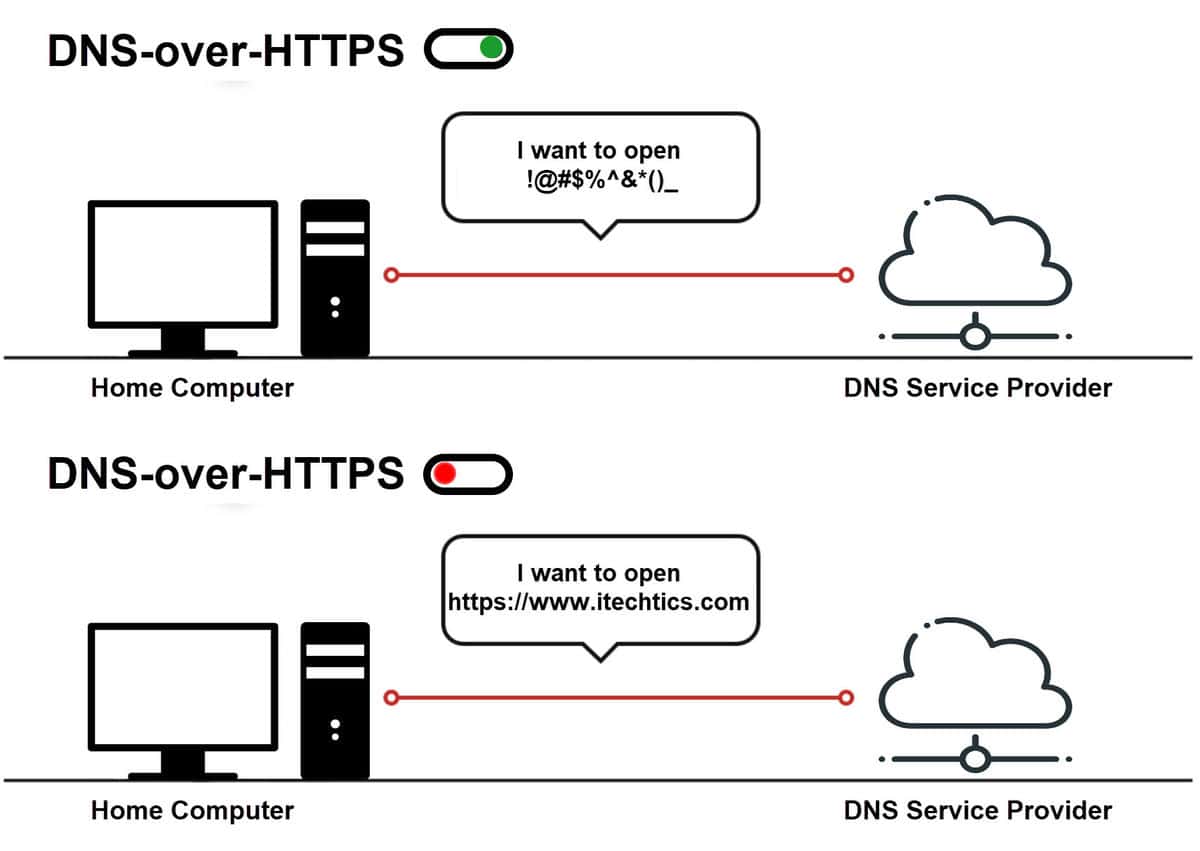
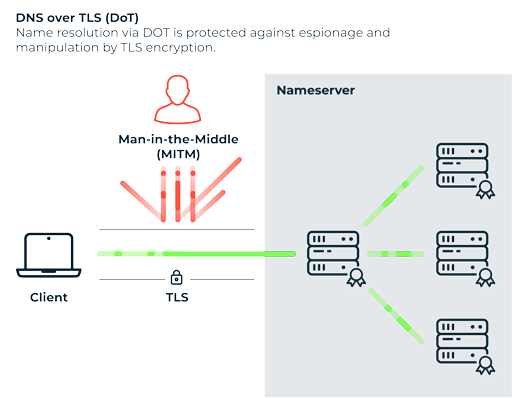
DoH and DoT encrypt DNS queries, preventing networks from seeing or modifying them. While this is excellent for privacy, it can clash with networks that expect to manage DNS centrally, such as corporate Wi-Fi, ISP-level routing optimizers, parental control systems, or region-based traffic steering.

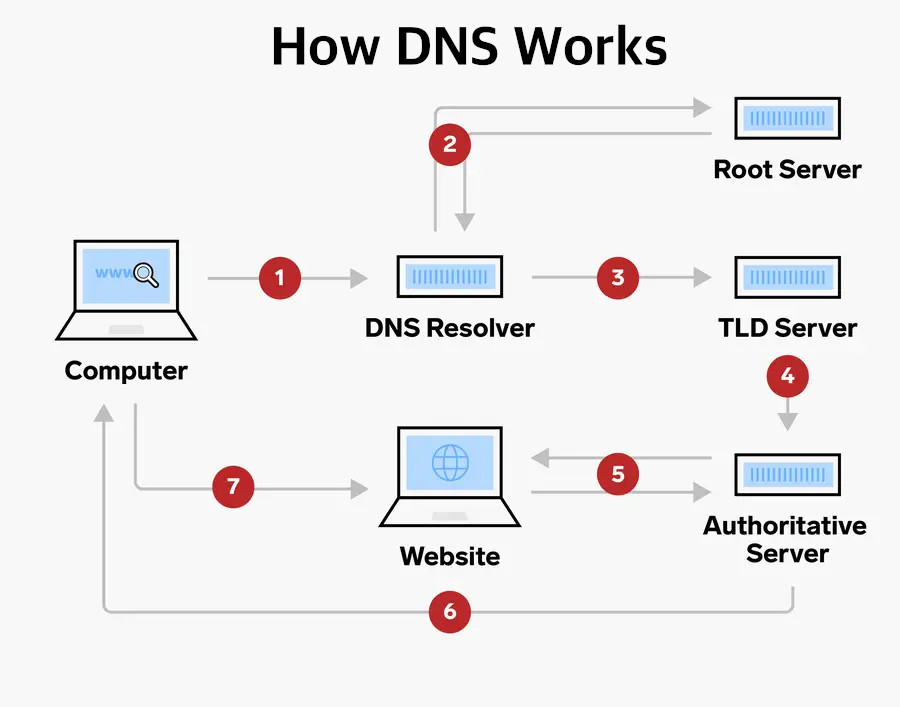
When the resolver used by your device returns IP addresses that conflict with the network’s routing expectations, Facebook’s traffic may be misrouted, blocked, or rejected at the TLS validation stage. Other apps may continue working because they use simpler DNS logic or cached results, reinforcing the illusion that Facebook alone is broken ⚠️.

🧠 How DoH / DoT Resolver Incompatibility Is Created

This problem usually appears after a change, not randomly. A system update enables Private DNS. A browser update activates DoH globally. A user installs a privacy-focused DNS provider. Or a router firmware update introduces DNS interception rules.

Now your device sends encrypted DNS queries directly to an external resolver, while the network still assumes it controls name resolution. The two disagree about which server Facebook should connect to. Facebook resolves a hostname, attempts a secure connection, and immediately detects that the endpoint or certificate does not match expectations. Rather than exposing security details, it simply reports that it cannot connect to the server 😶‍🌫️.

See also  Why Do My TikTok Videos Look Low Quality?

Image

Image

Image

🛠️ How to Detect a DoH / DoT Incompatibility Without Guesswork

The strongest signal is selective failure. Facebook fails consistently, while general browsing and other apps remain unaffected. Switching networks is another decisive test. If Facebook works instantly on mobile data or a different Wi-Fi network, the issue is tied to how DNS is resolved on the original network.

Another clear indicator is resolver dependency. Disabling Private DNS on Android, turning off encrypted DNS in the browser, or reverting to automatic DNS often fixes the issue immediately. That instant change confirms that the problem was not connectivity, but resolution path incompatibility 🧪.

Advanced users sometimes notice that Facebook fails only when certain DNS providers are used. This is not because those providers are bad, but because their resolution paths do not align with Facebook’s routing expectations in that specific network context.

📊 A Real-World Scenario That Illustrates It Perfectly

In one diagnostic case, a user enabled Private DNS using a well-known privacy resolver. Facebook immediately stopped loading, showing “Can’t connect to server,” while YouTube, Google, and news sites worked flawlessly. Switching Private DNS back to automatic restored Facebook instantly. Nothing else changed. The internet was never down. The resolver path simply stopped matching what Facebook’s backend expected. The user described it as “Facebook refusing to trust my internet,” which is surprisingly accurate 😊.

📈 A Metaphor That Makes the Conflict Obvious

Imagine asking for directions using a private guide who insists on sending you through side streets, while the destination only accepts visitors arriving via the main road. You reach the city, but you are stopped at the gate because you came the wrong way. DoH and DoT change how you ask for directions, and sometimes that conflicts with how the destination expects you to arrive 🚦🗺️.

See also  Competition and Algorithm Challenges on TikTok

Image

Image

❓ Frequently Asked Questions (FAQ)

  1. Why does Facebook say it can’t connect while other apps work?
    Because Facebook enforces stricter DNS and TLS validation.
  2. Is this a Facebook outage?
    No, outages affect users across networks.
  3. Does disabling Private DNS fix it?
    Very often, yes.
  4. Is DoH insecure?
    No, it is secure, but not always compatible.
  5. Why does mobile data work instantly?
    Mobile networks use different DNS resolution paths.
  6. Can routers cause this issue?
    Yes, especially if they intercept or rewrite DNS.
  7. Does changing DNS providers help?
    Sometimes, depending on routing compatibility.
  8. Is this related to VPN usage?
    Indirectly, VPNs often bundle custom DNS resolvers.
  9. Does clearing app cache help?
    No, because the problem is outside the app.
  10. Is this permanent?
    No, adjusting DNS settings resolves it.

🤔 People Also Ask

Why does Facebook fail but Google works?
Because Google tolerates more DNS variation.

Can encrypted DNS break apps?
Yes, if routing expectations conflict.

Why does Facebook show a generic error?
To avoid revealing security logic.

Is this common on corporate Wi-Fi?
Extremely common.

Should I avoid DoH entirely?
No, but be aware of compatibility trade-offs.

✅ Final Thoughts

When Facebook shows “Can’t connect to server” even though your internet works perfectly, the problem is not bandwidth, signal strength, or app stability. A DoH or DoT resolver incompatibility creates a quiet but decisive mismatch between how your device resolves Facebook’s servers and how Facebook expects those connections to arrive. Once that mismatch is removed, Facebook does not need to be fixed, reinstalled, or repaired. It simply reconnects, as if nothing was ever wrong, because at last, the path makes sense again 😌🌐.

🌐 “Can’t Connect to Server” but the Internet Works: DoH / DoT Resolver Incompatibility Explained

If you open Facebook and are met with the frustrating message “Can’t connect to server”, while at the same time websites load normally, videos stream without issue, and other apps behave as if nothing is wrong, you are not dealing with a weak connection, a temporary outage, or a broken app. This very specific contradiction almost always signals a DoH or DoT resolver incompatibility, a modern DNS-layer problem that hides beneath an otherwise healthy-looking internet connection 🌐😵‍💫.

This issue feels especially deceptive because it breaks one of our strongest assumptions: if the internet works, apps should work. In reality, modern apps like Facebook rely on far more complex resolution and security paths than a simple browser page load, and when those paths clash with encrypted DNS resolvers, the failure can be silent, selective, and deeply confusing.

🔍 Definition: What Does “Can’t Connect to Server” Really Mean in This Context?

When Facebook says it cannot connect to the server while your internet clearly works, the app is not saying it cannot reach the internet at all. It is saying that it cannot successfully complete a secure, validated connection to Facebook’s backend endpoints.

See also  Twitter/X Polls Not Showing or Not Ending: Duration, Options, and Access Fixes

Facebook does not rely on plain DNS alone. It expects consistent, policy-compliant resolution results, often combined with TLS validation, certificate pinning, and region-aware routing. When a device uses DNS over HTTPS (DoH) or DNS over TLS (DoT) resolvers that behave differently from what the network or app expects, name resolution technically succeeds, but the resulting connection path becomes invalid or unusable. The app reaches a server, just not one it is willing to trust 🧩.

📌 Why This Happens Even Though the Internet “Works”

Browsers are forgiving. They retry, fall back, and tolerate redirects or partial failures. Facebook’s app is not. It prioritizes security and consistency over flexibility.

DoH and DoT encrypt DNS queries, preventing networks from seeing or modifying them. While this is excellent for privacy, it can clash with networks that expect to manage DNS centrally, such as corporate Wi-Fi, ISP-level routing optimizers, parental control systems, or region-based traffic steering.

When the resolver used by your device returns IP addresses that conflict with the network’s routing expectations, Facebook’s traffic may be misrouted, blocked, or rejected at the TLS validation stage. Other apps may continue working because they use simpler DNS logic or cached results, reinforcing the illusion that Facebook alone is broken ⚠️.

🧠 How DoH / DoT Resolver Incompatibility Is Created

This problem usually appears after a change, not randomly. A system update enables Private DNS. A browser update activates DoH globally. A user installs a privacy-focused DNS provider. Or a router firmware update introduces DNS interception rules.

Now your device sends encrypted DNS queries directly to an external resolver, while the network still assumes it controls name resolution. The two disagree about which server Facebook should connect to. Facebook resolves a hostname, attempts a secure connection, and immediately detects that the endpoint or certificate does not match expectations. Rather than exposing security details, it simply reports that it cannot connect to the server 😶‍🌫️.

See also  TikTok Running Slow: Performance Tips

Image

Image

Image

🛠️ How to Detect a DoH / DoT Incompatibility Without Guesswork

The strongest signal is selective failure. Facebook fails consistently, while general browsing and other apps remain unaffected. Switching networks is another decisive test. If Facebook works instantly on mobile data or a different Wi-Fi network, the issue is tied to how DNS is resolved on the original network.

Another clear indicator is resolver dependency. Disabling Private DNS on Android, turning off encrypted DNS in the browser, or reverting to automatic DNS often fixes the issue immediately. That instant change confirms that the problem was not connectivity, but resolution path incompatibility 🧪.

Advanced users sometimes notice that Facebook fails only when certain DNS providers are used. This is not because those providers are bad, but because their resolution paths do not align with Facebook’s routing expectations in that specific network context.

📊 A Real-World Scenario That Illustrates It Perfectly

In one diagnostic case, a user enabled Private DNS using a well-known privacy resolver. Facebook immediately stopped loading, showing “Can’t connect to server,” while YouTube, Google, and news sites worked flawlessly. Switching Private DNS back to automatic restored Facebook instantly. Nothing else changed. The internet was never down. The resolver path simply stopped matching what Facebook’s backend expected. The user described it as “Facebook refusing to trust my internet,” which is surprisingly accurate 😊.

📈 A Metaphor That Makes the Conflict Obvious

Imagine asking for directions using a private guide who insists on sending you through side streets, while the destination only accepts visitors arriving via the main road. You reach the city, but you are stopped at the gate because you came the wrong way. DoH and DoT change how you ask for directions, and sometimes that conflicts with how the destination expects you to arrive 🚦🗺️.

See also  How to Collaborate Across Time Zones Seamlessly

Image

Image

❓ Frequently Asked Questions (FAQ)

  1. Why does Facebook say it can’t connect while other apps work?
    Because Facebook enforces stricter DNS and TLS validation.
  2. Is this a Facebook outage?
    No, outages affect users across networks.
  3. Does disabling Private DNS fix it?
    Very often, yes.
  4. Is DoH insecure?
    No, it is secure, but not always compatible.
  5. Why does mobile data work instantly?
    Mobile networks use different DNS resolution paths.
  6. Can routers cause this issue?
    Yes, especially if they intercept or rewrite DNS.
  7. Does changing DNS providers help?
    Sometimes, depending on routing compatibility.
  8. Is this related to VPN usage?
    Indirectly, VPNs often bundle custom DNS resolvers.
  9. Does clearing app cache help?
    No, because the problem is outside the app.
  10. Is this permanent?
    No, adjusting DNS settings resolves it.

🤔 People Also Ask

Why does Facebook fail but Google works?
Because Google tolerates more DNS variation.

Can encrypted DNS break apps?
Yes, if routing expectations conflict.

Why does Facebook show a generic error?
To avoid revealing security logic.

Is this common on corporate Wi-Fi?
Extremely common.

Should I avoid DoH entirely?
No, but be aware of compatibility trade-offs.

✅ Final Thoughts

When Facebook shows “Can’t connect to server” even though your internet works perfectly, the problem is not bandwidth, signal strength, or app stability. A DoH or DoT resolver incompatibility creates a quiet but decisive mismatch between how your device resolves Facebook’s servers and how Facebook expects those connections to arrive. Once that mismatch is removed, Facebook does not need to be fixed, reinstalled, or repaired. It simply reconnects, as if nothing was ever wrong, because at last, the path makes sense again 😌🌐.

More from author

LEAVE A REPLY

Please enter your comment!
Please enter your name here

Related posts

Latest posts

EU AI Act Implementation: What Guidelines Are Likely to Clarify (and What They Won’t)

If you’re trying to build a real compliance plan for the EU AI Act without turning your organization into a permanent policy workshop, you’re...

Valorant Vanguard Error: Anti-Cheat Fixes

🛡️ Valorant Vanguard Error: Anti-Cheat Fixes (Ultimate 2025 Guide) There are few things in gaming as frustrating as firing up Valorant, mentally preparing for a...

How R&D Drives Performance Improvements in Industrial Machinery

When I think back to my first days in the machinery industry, innovation always seemed like something reserved for large corporations with endless budgets....

Innovations in Packaging: Using Durfoam Foam for Shock and Impact Protection in Transit

When I first unpacked a delicate electronic component that had traveled halfway across the world and found it in perfect condition, I couldn’t help...

League of Legends “Reconnect Loop” Error

🔄 League of Legends "Reconnect Loop" Error: The Complete 2025 Fix Guide Few things in gaming are as infuriating as launching League of Legends, loading...

PlayStation Error CE-34878-0: Fixing Game Crashes

🎮 PlayStation Error CE-34878-0: Fixing Game Crashes (Ultimate Guide for PS4 & PS5 Gamers) There are few things in gaming as infuriating as being completely...

Want to stay up to date with the latest news?

We would love to hear from you! Please fill in your details and we will stay in touch. It's that simple!